The free WordPress calculator plugin
Put a mortgage, loan, paycheck or retirement calculator on any post or page — 27 of them, as a block, a shortcode, or just by pasting the link. No account, no ads, no cookies, no email capture.
Version 1.3.0 · 35 KB · GPLv2 or later
Requires WordPress 6.0 or later and PHP 7.2. Tested on WordPress 7.1.
It isn't in the WordPress plugin directory yet — that review takes weeks, and you shouldn't have to wait for it. This is the finished 1.0.0: install it with Plugins → Add New Plugin → Upload Plugin.
Step 1
Download and upload
Download the zip below. In WordPress: Plugins → Add New Plugin → Upload Plugin → choose the file → Install Now → Activate.
Step 2
Add the block
Edit a post, add the Far Better Off Calculator block, and pick a calculator from the dropdown. The editor shows the real widget, not a placeholder.
Step 3
Publish
There are no settings to configure and no account to create. Optionally set a theme, a maximum width and the numbers it opens on.
What it looks like
Screenshots of version 1.2.0, installed from a zip like the one above on WordPress 7.1 and driven in a browser. Not mockups. Tap one to open it full size. The download is 1.3.0; the pictures have not been retaken since 1.2.0, so nothing added after it is in them — the dropdown in the screenshot is shorter than the one you get.
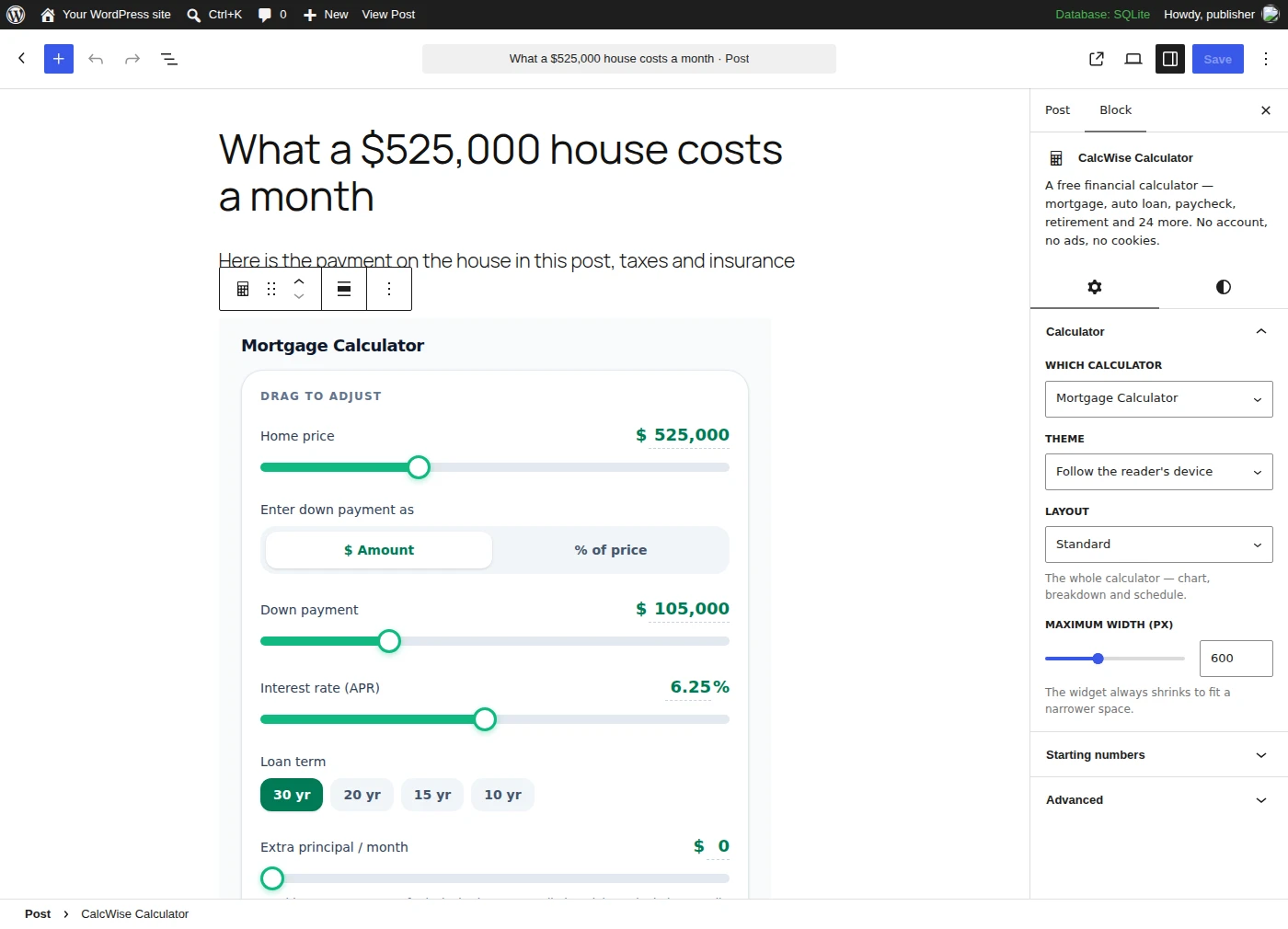
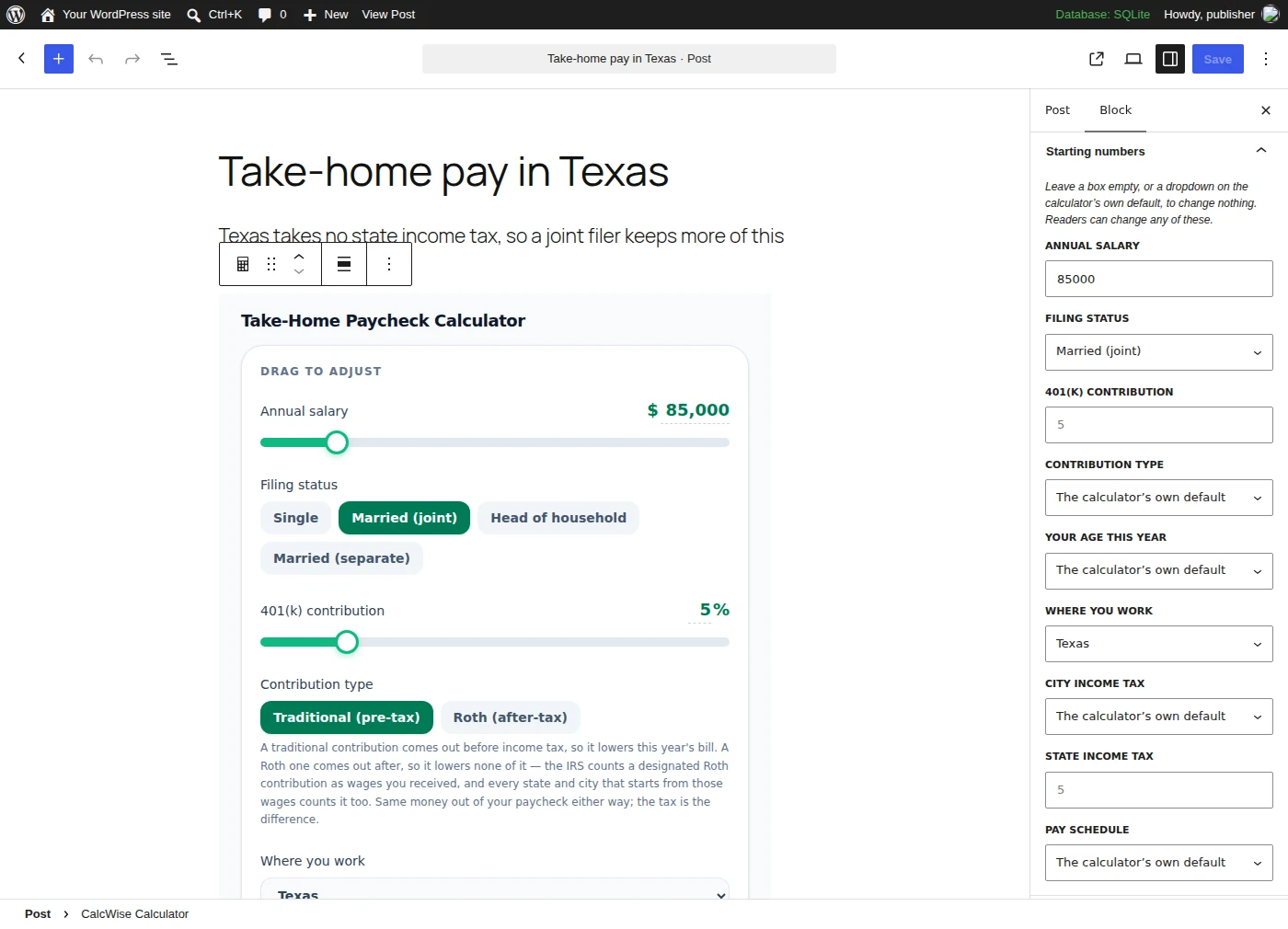
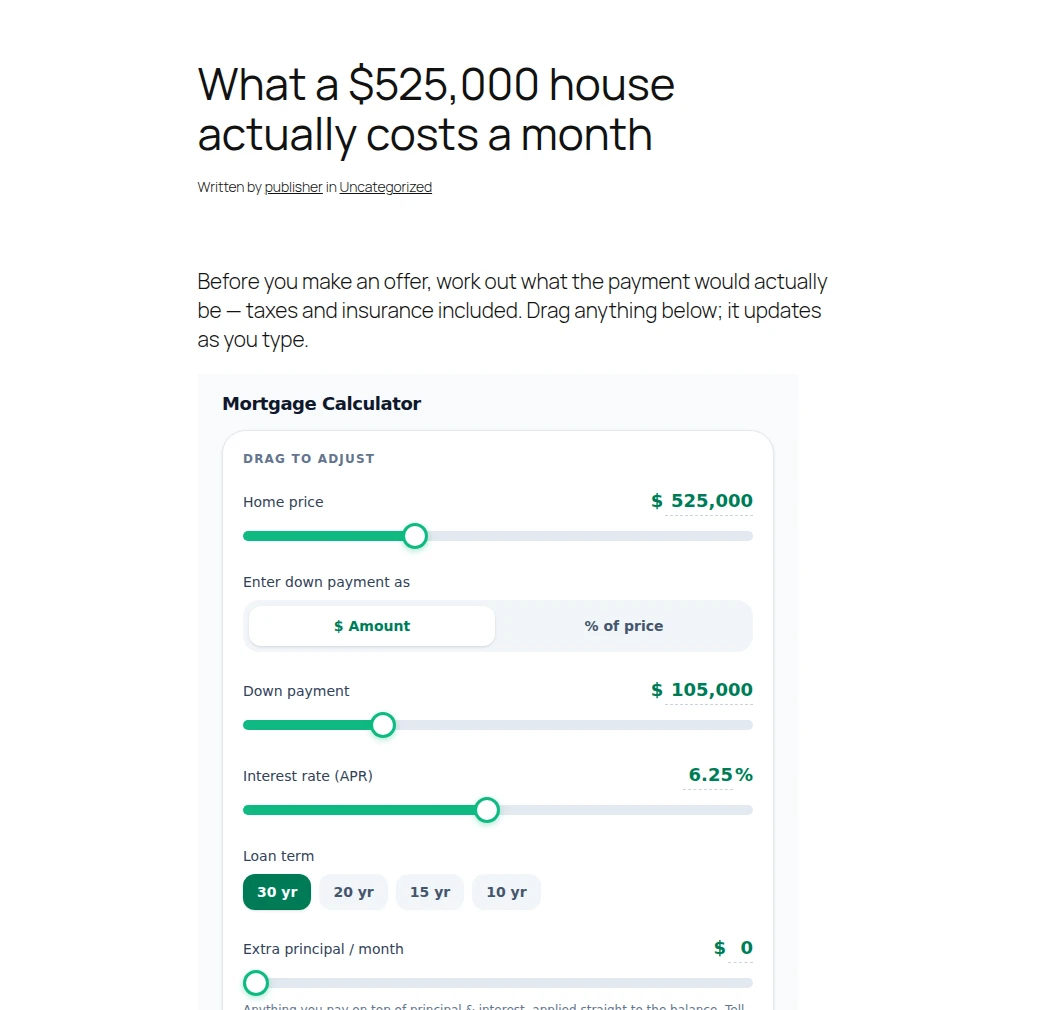
The mortgage rate in the pictures is a starting value the publisher typed, not a rate we are quoting — the calculator seeds today's from the Freddie Mac survey. See the current rates →
Three ways to add a calculator
All three render the same widget from the same code, so they behave identically.
1. The block
Add Far Better Off Calculator, pick from a dropdown of all 27, and set the theme, the layout, the maximum width and the starting values in the sidebar — every box the calculator asks you to type in, and every dropdown it offers. The editor preview is rendered by the plugin itself, so what you see while writing is exactly what publishes.
2. The shortcode
Anywhere shortcodes run — the classic editor, widgets, page builders. It takes the same settings the block does — theme, layout, max_width— and any attribute that isn't a setting is treated as a starting value, so it keeps working when a calculator gains a field.
[calcwise slug="mortgage-calculator" theme="dark" home_price="525000"]3. Paste the link
With the plugin active, pasting a calculator URL such as https://farbetteroff.com/calculators/auto-loan-calculator on its own line becomes the live calculator, because the plugin registers Far Better Off as an oEmbed provider and renders the result itself — so the widget still resizes and still carries its credit link.
What it does to your site
Close to nothing, which is the point. Far Better Off is a calculator, not a funnel.
No cookies, no trackers
The plugin sets none and the widget sets none. Your PHP makes no outbound request at all — the reader's browser loads the calculator.
Nothing in your database
No tables, no options, no cron jobs. Remove it and the only trace is the shortcode text in your posts.
2.2 KB, and only where it's used
1.5 KB of JavaScript and 0.7 KB of CSS, enqueued only on pages that actually show a calculator.
It fits your column
The widget sizes itself to the calculator, so there is no inner scrollbar and no empty space, and follows your reader's light or dark setting unless you pin it.
How this build was tested
Version 1.2.0, installed from its own zip on a real WordPress. The download is 1.3.0, which changes the height each widget opens at and nothing about installing it; that change is covered by the plugin's own PHP tests, and the checklist below is re-run before the directory submission.
- Installed from that build's own zip on WordPress 7.1 running PHP 8.4, through WordPress's own plugin uploader, and activated with no errors, notices or deprecations.
- In a browser: the block is findable in the inserter by name, and its editor preview renders the real widget rather than a placeholder.
- The block, the shortcode and a pasted link all produce the same markup, with the credit link in the site's own HTML.
- On a published post, two calculators sized themselves to their own content — 2528px and 1854px, not a shared guess — and a publisher's starting numbers computed the right answer while staying editable by the reader.
- That page set zero cookies, raised no JavaScript errors, and contacted no host other than the site itself and the one serving the calculator. A page with no calculator on it loaded nothing at all from the plugin.
- Deactivating and deleting the plugin left no options and no tables behind, and the posts kept their content.
- The plugin's PHP has its own assertion suite, run on every change, covering the URL each setting produces, the height each widget opens at, number formatting, and hostile input.
SHA-256 of the download: 7dba4aeae88a2b0d99917350a2d342b275ce5d4b50ddd146ef7dd21c02bba140
What the calculators do and don't do
- The take-home paycheck calculator is federal only — federal income tax, Social Security and Medicare — plus a flat state rate where a state has one. It is not a payroll system.
- The rent-vs-buy calculator does not include PMI. The mortgage and house-affordability calculators do.
- Every calculator is an estimate for planning, not tax, legal or investment advice.
Questions site owners ask
Is it free, and is there a paid tier?
It's free and there is no paid tier, no account and no usage limit. We ask one thing: keep the small "Powered by Far Better Off" line that renders under the calculator.
Is it in the WordPress plugin directory?
Not yet — it's been written and tested but not submitted, and that review takes weeks. Until it's listed, install it the way you'd install any plugin you've downloaded: Plugins → Add New Plugin → Upload Plugin → choose the zip.
Do my readers' numbers go anywhere?
No. The calculators run entirely in the reader's browser. Nothing they type is sent to Far Better Off, to you, or to anyone else, and there is no email capture or lead form inside the widget.
Does it set cookies or load trackers?
No. The plugin sets no cookies and the widget sets none. On a real WordPress install serving the plugin's own output, the only third-party host the page contacts is farbetteroff.com, for the calculator itself.
Will it slow my site down?
It adds 1.5 KB of JavaScript and 0.7 KB of CSS, and only on pages that actually show a calculator — a page without one loads nothing from the plugin at all. Your server makes no outbound request; the reader's browser loads the widget, lazily.
Can I set the starting numbers?
Yes. In the block, open "Starting numbers" in the sidebar. In a shortcode, add the field as an attribute: [calcwise slug="mortgage-calculator" home_price="525000" rate="5.875"]. Readers can still change everything — a starting number is a starting point, not a lock.
Can I preset a dropdown too, not just a number?
Yes, as of plugin 1.2.0. The same sidebar panel lists every dropdown the calculator has — the state a paycheck is taxed in and its filing status, a 15-year term instead of 30, monthly or yearly compounding, "minimum only" on the card payoff — so a widget can open the way your post reads. In a shortcode it is the field's own value: [calcwise slug="mortgage-calculator" term_years="15"], which the shortcode accepted before the block offered it.
Can I add a live rates table, not just a calculator?
Yes, as of plugin 1.3.0. Four of the choices in the block's dropdown are tables rather than calculators: Today's rates (nine rates with their reading dates, from the Federal Reserve's own feed), Mortgage rates and Savings & CD rates (three rows each, cut from that same table for one kind of page), and Money numbers (ten figures a personal-finance post quotes and has to re-check every January). They refresh themselves every six hours, so you paste one once and never come back to it. In a shortcode it is the same one line: [calcwise slug="rates"]. There is nothing to preset and no compact layout, because the table is already the short form of its page.
Can I put a calculator in a sidebar?
Yes — add layout="compact" to the shortcode, or pick Compact in the block's sidebar. That trims the widget to the answer and the inputs, with the answer above the sliders, and starts it at 360px wide instead of 600px. Everything still computes; there's just no chart, breakdown or schedule to scroll past.
Can I put two calculators on one page?
Yes, including two copies of the same one. Each frame measures and sizes itself, so they don't fight over a shared height.
What happens if I remove the plugin?
Nothing is left behind: no database tables, no options, no cron jobs. Your posts keep their shortcode text, so re-activating brings the calculators straight back.
I'm not on WordPress. Can I still embed a calculator?
Yes. The embed builder writes a snippet for any site — an iframe or a single line of script — and platforms that support oEmbed turn a pasted calculator link into the widget on their own.
Not on WordPress?
The embed builder writes a copy-ready snippet for any site — an iframe or one line of script — with a live preview. Open the embed builder →
Building something instead?
The same math is a free JSON API — no key, no signup, CORS open. Read the API docs →
Something misbehaving, or a calculator you wish it had? Email hellofarbetteroff@gmail.com.